EDB Postgres Advanced Server (EPAS) is built on PostgreSQL and has been merging changes from the upstream project for over 15 years. Every new major release of PostgreSQL results in a new major release of EPAS.
You can initialize EPAS in one of two modes: Berkeley/Postgres and Redwood/Oracle. Initializing in Redwood Mode helps developers familiar with Oracle by setting
date/time Postgres GUCs to behave like Oracle Database plus adds many DBMS_ and UTL_ subprograms that Oracle Database developers are likely familiar with. This post focuses on the User Profiles capabilities under the advanced security additions to EPAS.
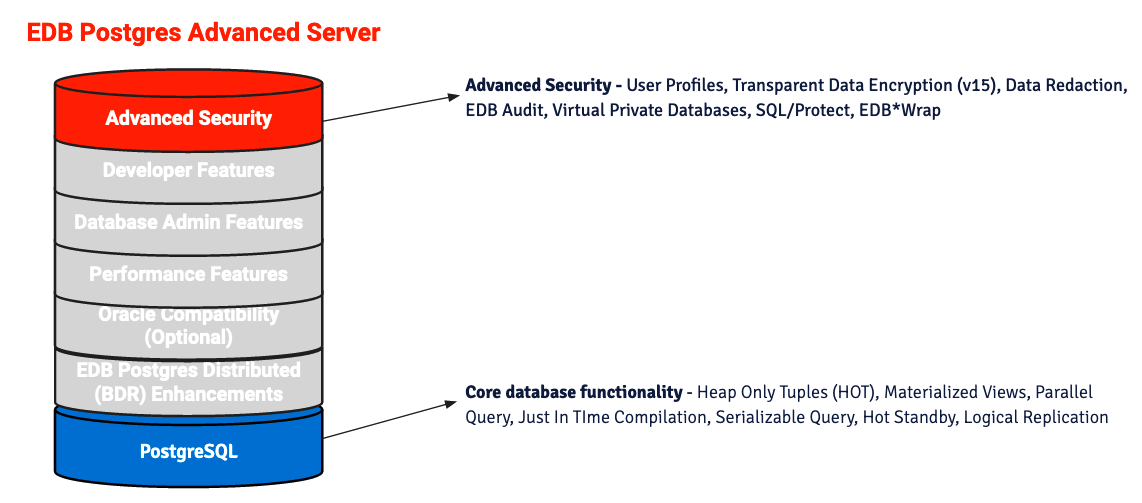
Since EPAS is Postgres, all user/role concepts from PostgreSQL apply. As usual, the PostgreSQL documentation covers database users and privileges in depth. Plenty of bloggers have written on this topic with valuable perspectives, and you can find them with a simple search. An additional and optional capability EPAS adds to user management in Postgres is User Profiles. The concept of User Profiles will be familiar to many users of commercial database systems.
This blog post aims to remind people how User Profiles in EPAS help you meet the password requirements of your organization.
Password Complexity
The main benefit of password complexity is that it makes a password harder to crack than a dictionary word. Harder, meaning that it will theoretically take a computer a long time to break a reasonably long password with a combination of letters, numbers, and characters. To test this, you only need to set a password to a string of characters and use one of the many password crackers online that will quickly find a match.
Whether or not you are convinced that password complexity rules are meaningful security measures, it often doesn’t matter, as almost all organizations have password complexity rules that apply to database systems.
PostgreSQL has no internal mechanism to enforce password complexity, and the PostgreSQL catalog tables do not indicate how long or complex a user’s password could be. The following two commands that create roles with login privileges will succeed:
create user dolores with password '<BGZ8#qZ\O|XXll';
create user maeve with password 'abc';
If you look at the pg_user and pg_shadow tables, you cannot tell that one password only contains three letters and the other is longer with a mix of letters and numbers. The pg_user table would reveal if no password has been set for a role. Not being able to glean more information about a user’s password likely has more upside than downside.
-[ RECORD 1 ]----------------------------------------------------------------------------------------------------------------------------------
usename | dolores
passwd  | SCRAM-SHA-256$4096:Ym8P3kLM+65/KK7r+gHQ/g==$md1qpwP2TC+rlnty5wXEpL51Ba/vUphDUCRnrNgB0z0=:sY8sZ9OjnH4nutv1H+MoK9hH0ojvWM7w0ueM6jL0LUI=
passwd  | ********
-[ RECORD 2 ]----------------------------------------------------------------------------------------------------------------------------------
usename | maeve
passwd  | SCRAM-SHA-256$4096:fNidP3OzqTpnbFIGRqj6fw==$6sNo44R3VGarHOPtUA4FIMCYexoQyvDUG9mKrfS180Q=:EQ/3JMlHrAAQksHM6KPoVSohzI5lyB5Sf7j3C8mlEOY=
passwd  | ********
Enforcing complexity with User Profiles
User Profiles are flexible in the way policies can be enforced. You can apply any or all of the several policy rules in EPAS. The actual flexibility provided to you is by allowing you to write database functions that enforce your organization’s unique policy.
Many organizations use the National Institute of Standards and Technology (NIST) guidance when crafting policy. And since NIST guidance ranks password length above password complexity, let’s start with an example of enforcing password length with User Profiles in EPAS by writing a database function. We will create a Profile and password verification function using edbspl to associate with our newly created Profile.
CREATE OR REPLACE FUNCTION sys.verify_password(user_name varchar, new_password varchar, old_password varchar)
RETURN boolean IMMUTABLE
IS

BEGIN
  IF (length(new_password) < 15)
  THEN
   RAISE EXCEPTION 'Password must consist of 15 or more characters';
  END IF;

  RETURN true;
END;

CREATE PROFILE org_password_policy LIMIT PASSWORD_VERIFY_FUNCTION verify_password;
Now that we have our policy set, let’s create user maeve like above, but associate the newly created Profile with maeve:
create user maeve password 'abc' profile org_password_policy;
ERROR:  Password must consist of 15 or more characters
This time we cannot create a new login role for maeve using the same password because the password does not contain enough characters. Enforcing character length alone goes a long way, but your organization likely has more requirements. And your organization could have different policies for different groups. So, it’s best to future-proof with separate functions for checking and setting password rules. Doing so prevents you from forking multiple verify_password functions and allows you to add additional rules and fix bugs easily.
Let’s create a new password rule checker function and a function associated with a User Profile that defines the password rules. For portability, we will use a function that follows similar logic to Oracle’s and other commercial databases but works in both Redwood and non-Redwood modes in EPAS. Most of Oracle’s sample scripts for User Profiles work out of the box in Redwood Mode, and many DBAs are familiar with this pattern already. In our password_rule_checker, we will create checks to escape the delimiters and password length and enforce a mix of letters and lower and upper case characters. Here are the possible exceptions thrown from our password rule check function.
  IF substring(new_password FROM old_password) IS NOT NULL
  THEN
    RAISE EXCEPTION 'New password cannot include old password';
  END IF;

   IF delimiter = TRUE THEN
      RAISE EXCEPTION 'Password cannot contain a double-quote character';
   END IF;

   IF chars IS NOT NULL AND len < chars THEN
      RAISE EXCEPTION 'Password length less than % ', chars;
   END IF;

   IF letter IS NOT NULL AND cnt_letter < letter THEN
      RAISE EXCEPTION 'Password must contain at least % letter(s)', letter;
   END IF;

   IF digit IS NOT NULL AND cnt_digit < digit THEN
      RAISE EXCEPTION 'Password must contain at least % digit(s)', digit;
   END IF;
Next, we will create a new function that sets the password complexity rules: at least eight characters long, must contain one number, and at least one lower and one upper case character.
CREATE OR REPLACE FUNCTION sys.password_rules
(username varchar,new_password varchar, old_password varchar)
RETURN boolean IMMUTABLE
IS
BEGIN
   IF NOT password_rule_checker(new_password, old_password, chars => 8, letter => 1, digit => 1) THEN
      RETURN(FALSE);
   END IF;
   RETURN(TRUE);
END;
Now let’s go back through the previous scenario, creating a User Profile and new login role while testing several scenarios.
postgres=# create user maeve password 'abc"1234' profile org_password_policy;
ERROR:  Password cannot contain a double-quote character

postgres=# create user maeve password 'abc123' profile org_password_policy;
ERROR:  Password length less than 8

postgres=# create user maeve password '12345678' profile org_password_policy;
ERROR:  Password must contain at least 1 letter(s)

postgres=# create user maeve password 'abcdefgh' profile org_password_policy;
ERROR:  Password must contain at least 1 digit(s)

postgres=# create user maeve password 'abcd1234' profile org_password_policy;
CREATE ROLE
These examples demonstrate how you can easily enforce any password policy with User Profiles in EPAS. One could easily add additional requirements like checking the password string for upper and lower characters and block setting a password to one that matches a password in a common password list.
Failed login attempts
While the first defense strategy should control where users can connect via pg_hba.conf settings, you should always add additional defense layers and assume that, at some point, other areas of your infrastructure will be misconfigured or even compromised.
For this, let’s assume a malicious actor comes from an IP that matches a rule in your pg_hba.conf. Having a good complexity rule in place will help ensure that the malicious actor can’t guess the password quickly. To keep anyone from using a password cracker without disruption, we can follow the examples from EDB Docs and add FAILED_LOGIN_ATTEMPTS and PASSWORD_LOCK_TIME. If you’re familiar with fail2ban, think of these like maxretry and bantime.
We can demonstrate that it’s possible to keep trying different passwords without these rules until a person is alerted and intervenes. Let’s try five consecutive login attempts with bad passwords and then use the correct password on attempt six:
$ for v_pw in "qwerty" "Qwerty123" "password" "password1" "qwertyuiop" "abcd1234"; do
        export PGPASSWORD=${v_pw};
        psql -h 172.17.0.2 -d postgres -U maeve
done

psql: error: connection to server at "172.17.0.2", port 5444 failed: FATAL:  password authentication failed for user "maeve"
psql: error: connection to server at "172.17.0.2", port 5444 failed: FATAL:  password authentication failed for user "maeve"
psql: error: connection to server at "172.17.0.2", port 5444 failed: FATAL:  password authentication failed for user "maeve"
psql: error: connection to server at "172.17.0.2", port 5444 failed: FATAL:  password authentication failed for user "maeve"
psql: error: connection to server at "172.17.0.2", port 5444 failed: FATAL:  password authentication failed for user "maeve"

psql (15.1.0-beta1.1)
Type "help" for help.

postgres=>
Even after five consecutive failed attempts, we have a connection to the Postgres database on the sixth attempt. Five attempts could have been 500 attempts, and the result would have been the same. You can configure PostgreSQL to log those failed attempts, which would appear in your Postgres logs: 2023-01-07 21:49:18 UTC FATAL: password authentication failed for user "maeve". Many log management tools and services are available today that check log files and alert you on rules that you’ve established. The tail_n_mail logfile watcher is a well-known alternative in Postgres circles and detects interesting items in log files and alerts you via email. But, in our case, we want to stop a brute-force attack as it’s happening. To do this, we will set the number of failed login attempts to five and lock the login role for one day.
CREATE PROFILE org_password_policy LIMIT
    FAILED_LOGIN_ATTEMPTS 5
    PASSWORD_LOCK_TIME 1
    PASSWORD_VERIFY_FUNCTION password_rules;
With our new Profile rules in place, let’s try logging in as maeve with five passwords and then with the correct password on the sixth attempt:
$ for v_pw in "qwerty" "password" "password1" "qwertyuiop" "postgres" "abcd1234"; do
        export PGPASSWORD=${v_pw};
        psql -h 172.17.0.2 -d postgres -U maeve
done

psql: error: connection to server at "172.17.0.2", port 5444 failed: FATAL:  password authentication failed for user "maeve"
psql: error: connection to server at "172.17.0.2", port 5444 failed: FATAL:  password authentication failed for user "maeve"
psql: error: connection to server at "172.17.0.2", port 5444 failed: FATAL:  password authentication failed for user "maeve"
psql: error: connection to server at "172.17.0.2", port 5444 failed: FATAL:  password authentication failed for user "maeve"
psql: error: connection to server at "172.17.0.2", port 5444 failed: FATAL:  password authentication failed for user "maeve"
psql: error: connection to server at "172.17.0.2", port 5444 failed: FATAL:  role "maeve" is locked
This time, the database server locks maeve out after five failed attempts. When this happens, you can check the pg_user table for the extra uselockdate column in EPAS to see when a user locked their account.
postgres=# select usename, uselockdate from pg_user where usename = 'maeve';
 usename |          uselockdate
---------+-------------------------------
 maeve     | 2023-01-07 21:51:07.729187+00
Another common password rule is that a user of the system must change their password every x number of days, and a user cannot reuse a password within x number of days and must change their password so many times before using the password. We can use the PASSWORD_LIFE_TIME and PASSWORD_REUSE_* rules covered in EDB Docs to enforce these.
Other Considerations
Most organizations have a single source of truth for users and prefer to authenticate database users through a Directory server like LDAP. Authenticating database users against LDAP is covered in PostgreSQL docs and usually works without much fuss, which allows you to streamline activities like enforcing password complexity. You no longer have to mimic rules in the database that match your Directory server.
There are some considerations when authenticating against a 3rd party identity service:
- You can end up managing users in two places: the user gets added to LDAP, and now the DBA takes a second action to add the LDAP user to Postgres
- A few good tools, such as ldap2pg are available to reduce this burden: the user is added to an LDAP organizational unit by a Domain Administrator, and the synchronization runs at some interval to keep Postgres in sync with LDAP, either by adding the user to Postgres or removing the user from Postgres.
- Another challenge is the authentication between Postgres and LDAP since the LDAP bind user in many organizations has its own password. In practice, your synchronization tool has to store the bind user ID and password, and Postgres needs to store the bind user ID and password. There are some less commonly used ways of avoiding this, such as having PAM read from LDAP, but the most common case in practice is storing the LDAP configuration with options for search+bind in the pg_hba.conf. Note: EPAS 15 (Feb 2023) will have a module that lets you securely obfuscate the LDAP bind password with an external module. However, it’s not yet possible for that same external module to be used by other synchronization tools or a 3rd party connection pool.
- LDAP support among the various connection poolers varies. You will want to check your application-level connection pooling documentation or database-level connection pooler documentation to verify it meets your requirements for external authentication.
The challenges above may or may not be relevant to your use case. Hopefully, those challenges will be alleviated for everyone by the various tools soon. For now, EPAS users can meet organizational password policies with User Profiles in addition to the option of external identity services.
]]>